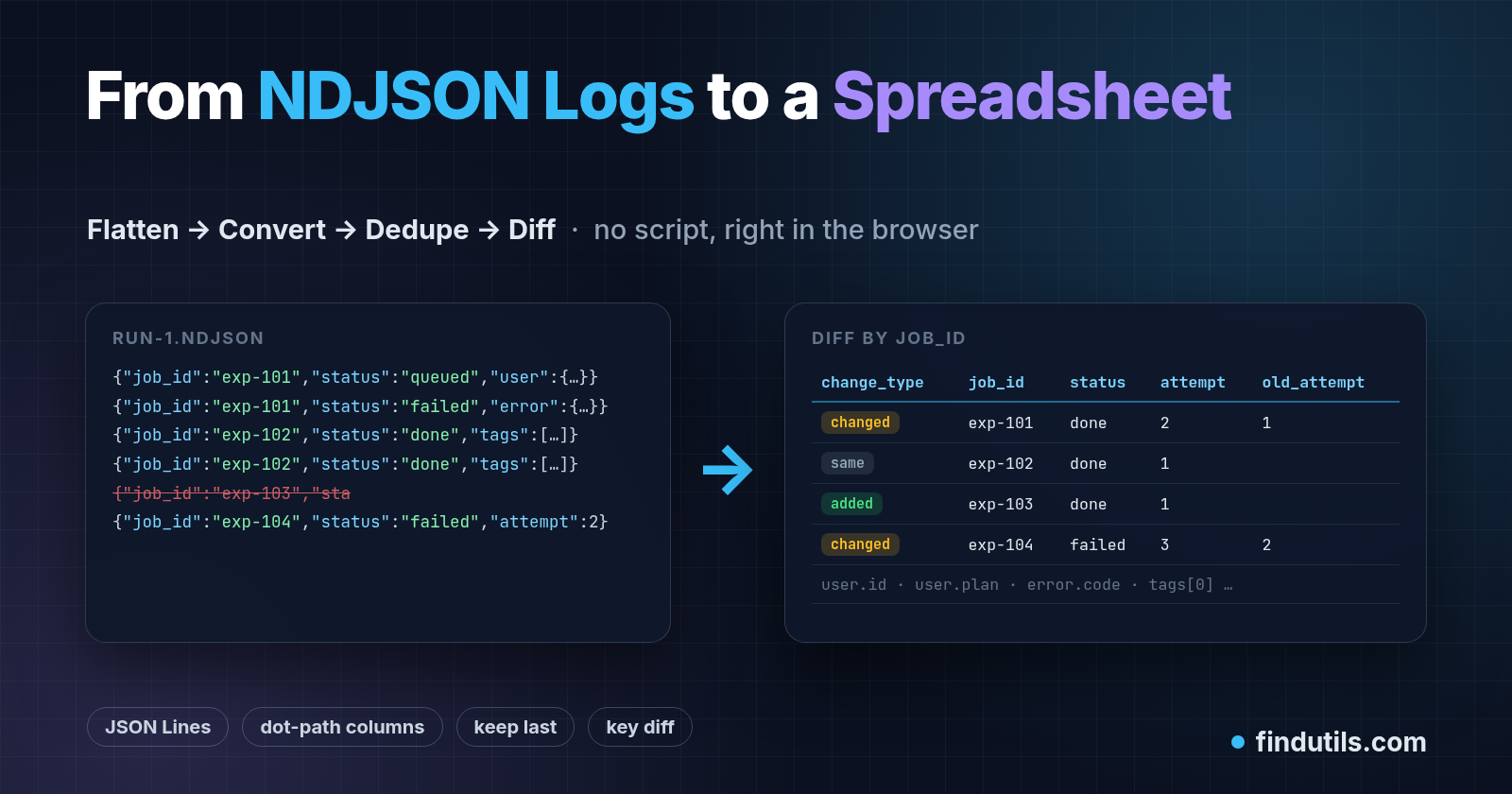
Someone on your team asks a simple question: "Which export jobs failed on Monday, and did the re-run fix them?" The answer is in your logs. The logs are NDJSON (JSON Lines): one JSON object per line, with nested fields, a few retries written twice, and the odd line that got cut off halfway.
You could write a jq pipeline or a pandas script. Often, though, the person asking lives in a spreadsheet, and you need the answer in ten minutes. This post walks through a workflow I keep reusing. Every step runs in the browser with FindUtils tools, and each tool page says it processes the file in your tab and doesn't upload it:
NDJSON → CSV with nested fields flattened into columns
Dedupe by
job_id, keeping the last event, which gives the latest state per jobTrim columns down to the ones that matter
Diff two runs by key, so you see added, removed and changed jobs
The sample log
Here is a small, made-up run-1.ndjson from a background export worker:
{"ts":"2026-10-12T09:00:01Z","job_id":"exp-101","status":"queued","attempt":1,"user":{"id":"u_17","plan":"pro"}}
{"ts":"2026-10-12T09:00:04Z","job_id":"exp-101","status":"failed","attempt":1,"user":{"id":"u_17","plan":"pro"},"error":{"code":"E_TIMEOUT"}}
{"ts":"2026-10-12T09:00:05Z","job_id":"exp-102","status":"done","attempt":1,"user":{"id":"u_42","plan":"free"},"tags":["csv","weekly"]}
{"ts":"2026-10-12T09:00:05Z","job_id":"exp-102","status":"done","attempt":1,"user":{"id":"u_42","plan":"free"},"tags":["csv","weekly"]}
{"ts":"2026-10-12T09:00:07Z","job_id":"exp-103","sta
{"ts":"2026-10-12T09:00:09Z","job_id":"exp-104","status":"failed","attempt":2,"user":{"id":"u_08","plan":"pro"},"error":{"code":"E_429"}}
It has all the usual problems: nested objects (user, error), an array (tags), a shipper retry that wrote line 4 twice, and a truncated line 5.
Why the usual tools stumble
JSON.parseon the whole file fails. An NDJSON file isn't one JSON document, so parsing everything at once breaks after the first line. Each line has to be parsed on its own.A "JSON to CSV" converter that expects an array can't read it either. And a converter that does read it often puts
userinto a single cell as{"id":"u_17",...}.jq works, but you have to know the keys up front, and it stops at the first broken line:
jq -r '[.ts, .job_id, .status, .attempt, .user.id, (.error.code // "")] | @csv' run-1.ndjson
# prints rows 1-4, then: jq: parse error: Invalid string ... at line 6
# (the cut-off string runs into the next line). exp-104 is never printed.
That's fine for a quick look. It's less fine when line 5 is line 48,213 and you need every row after it.
Step 1: NDJSON → CSV, with nested fields as columns
Open the NDJSON CSV Converter and drop the file in. A few behaviours from its documentation matter here:
Every line is parsed separately. A line that isn't valid JSON is skipped, counted, and listed in the notes as
Line N: invalid JSON. The other lines still convert, so you lose one row instead of the whole job, and you know exactly which line to chase.The header is the union of every key in every row, in the order keys first appear. A key that only shows up on line 900 still gets a column.
Flatten (the default) turns nested objects into dot paths (
user.id,error.code) and arrays into indexed columns (tags[0],tags[1]). Choose JSON cell if you'd rather keep an object or array as JSON text in one cell.nulland a missing key both become an empty cell. Numbers and booleans are written as text, and your spreadsheet decides the types when it opens the file.There are Separator (comma, semicolon, tab) and Excel BOM options for Excel setups that expect semicolons or show accented characters wrongly.
For the sample, you'd get:
ts,job_id,status,attempt,user.id,user.plan,error.code,tags[0],tags[1]
2026-10-12T09:00:01Z,exp-101,queued,1,u_17,pro,,,
2026-10-12T09:00:04Z,exp-101,failed,1,u_17,pro,E_TIMEOUT,,
2026-10-12T09:00:05Z,exp-102,done,1,u_42,free,,csv,weekly
2026-10-12T09:00:05Z,exp-102,done,1,u_42,free,,csv,weekly
2026-10-12T09:00:09Z,exp-104,failed,2,u_08,pro,E_429,,
The notes also tell you line 5 was skipped, so exp-103 is missing from this run. That's worth knowing before you report "3 jobs".
Big files: the converter's input cap is 10 MB. For a larger log, slice it first with standard tools and convert the slice:
# only the lines for one worker, or split into 50k-line parts
grep '"worker":"export"' app.ndjson > export-only.ndjson
split -l 50000 app.ndjson part-
Side note: when the source is a JSON array instead
If you're starting from an API response such as {"data":[...]} rather than a log file, use JSON Flatten. It finds the array under a data, results, items or records wrapper (or one level below, like data.items), and you can type any other location in Array path. Arrays can be joined with |, kept as JSON text, or spread into indexed columns, and a Depth setting limits how deep the dot paths go. One caveat from its tips applies to any JavaScript JSON parser: whole numbers above 9,007,199,254,740,991 lose precision, so have very long IDs sent as strings.
Step 2: keep the latest state per job (dedupe, keep last)
A log is a history. For "what state is each job in?", you want one row per job_id, specifically the last one.
Load the CSV into CSV Dedupe:
Pick
job_idas the key column. With no key picked, only rows that match in every cell count as duplicates, so you'd catch the retry on line 4 and nothing else.Under "When a row repeats, keep", choose Last row.
Leave Trim whitespace on (the default). Turn on Ignore case only if your IDs can differ in case.
The result:
ts,job_id,status,attempt,user.id,user.plan,error.code,tags[0],tags[1]
2026-10-12T09:00:04Z,exp-101,failed,1,u_17,pro,E_TIMEOUT,,
2026-10-12T09:00:05Z,exp-102,done,1,u_42,free,,csv,weekly
2026-10-12T09:00:09Z,exp-104,failed,2,u_08,pro,E_429,,
Two things make this safe to hand to someone else:
You can download
duplicates.csvas well ascleaned.csv. That's a record of every row that was removed, so you can check each decision.Kept rows stay in their original file order. "Keep last" means last in the file, so make sure the log is in time order (most shippers append in order, but merged files may not be).
Also note how blank keys behave: by default a row with an empty key is kept as unique. Ten events with no job_id won't collapse into one unless you choose Collapse into one.
Step 3: trim to the columns you want to compare
Before diffing two runs, drop the columns that change on every event but don't tell you anything, such as ts. Otherwise every job will look "changed". In CSV Column Extractor, keep job_id, status, attempt and error.code. Removing user.id here is also a small privacy win if the file is going outside your team.
Step 4: diff run 1 against run 2 by key
Do the same three steps for the re-run log (run-2.ndjson). Then open CSV Diff, put run 1 in File A (before) and run 2 in File B (after), and select job_id as the key column.
That last part matters. If you don't pick a key, the tool looks for a shared column named id, email, sku, uuid, key or code, and otherwise falls back to the first shared column whose values are unique in both files. job_id isn't on that list, so pick it yourself.
Because rows are matched by key rather than by line, a re-sorted file doesn't produce noise. For our two runs, the summary reads like this:
Added:
exp-103(the job lost to the truncated line in run 1 completed in run 2)Changed:
exp-101(statusfailed → done,attempt1 → 2,error.codecleared) andexp-104(attempt2 → 3, stillE_429)Unchanged:
exp-102
The csv-diff.csv download has a change_type column, the columns of File A plus any columns only File B has, and an old_ column for each column that changed somewhere (old_status, old_attempt, old_error.code). There's also a ZIP with added.csv, removed.csv and changed.csv, which is easy to paste into a ticket.
One tip from the tool's docs: pick a key that identifies the same real thing in both files. If you match on something that can itself change, an edited row turns into one "removed" plus one "added".
Step 5 (optional): back to NDJSON for a loader
If the cleaned table needs to go into something that reads JSON Lines, such as a warehouse loader or a fine-tune dataset, flip the same converter to CSV to NDJSON. Values stay strings unless you turn on Coerce types. With it on, true/false, null and plain numbers become JSON values, but a number with leading zeros like 007 stays text, and so does an integer of 2^53 or more. Dotted headers such as user.id stay flat keys. The tool deliberately doesn't rebuild nested objects.
Checklist
| Step | Tool | Setting that matters |
|---|---|---|
| Convert | NDJSON → CSV | Flatten vs JSON cell. Read the skipped-line notes |
| Latest state | CSV Dedupe | Key = job_id, keep Last row |
| Trim | Column Extractor | Drop timestamps and personal fields |
| Compare | CSV Diff | Pick the key yourself |
| Reload | CSV → NDJSON | Coerce types only if the loader needs it |
Logs carry request paths, user IDs and sometimes tokens. The tool pages say the files stay in your browser (you can confirm that in DevTools' Network panel while converting), but the CSV you export is a normal file. Redact it before it goes into a shared drive.
For more depth on each step, FindUtils has guides on NDJSON to CSV, deduping CSVs and diffing CSVs, plus a good read on why JSON → CSV → SQL loses data types.
About the author
- 463 free browser tools. No sign-up, no install. https://findutils.com
Comments
Join the discussionNo comments yet. Be the first to comment.